Management
The Overlooked Ergonomics of Standing Desk Cable Management
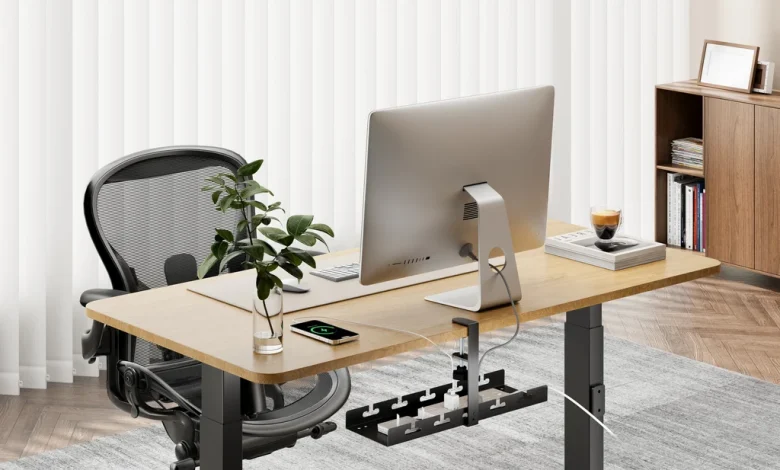
Most people treat cable management as an aesthetic chore. It is viewed as the final, tedious step of an office setup, performed primarily to make a workstation look tidy on video calls or to satisfy a personal craving for visual minimalism. Cable clips, raceways, and velcro ties are marketed almost exclusively as organizing accessories rather than health tools.
When applied to a height-adjustable desk, however, cable management ceases to be a decorative choice. It becomes a critical mechanical sub-system that directly influences human biomechanics.
A standard desk is static, meaning its physical boundaries never change. An electric sit-stand desk is a kinetic machine that continuously alters its spatial relationship to walls, floor outlets, and the human body working above it. When cables are improperly measured, routed, or anchored on a moving surface, they introduce physical resistance, mechanical traps, and subtle psychological hesitations that undermine the health benefits of an active workstation.
Understanding the ergonomic consequences of cabling is the difference between owning an expensive mechanical novelty and sustaining a healthy, dynamic daily routine.
How Restricted Cables Silently Distort Posture
The most common casualty of poor cable management is vertical calibration. Proper standing posture requires precision: the desk surface should align closely with resting elbow height, allowing the forearms to sit parallel to the floor while the shoulders remain completely relaxed. If a monitor arm is present, the top third of the screen should sit level with the eyes to keep the cervical spine neutral.
Taut wiring systematically dismantles these alignments through what can be termed the tension ceiling. When power cords, display cables, or hub connections lack adequate slack for full vertical travel, the desk hits an artificial boundary before it reaches proper standing height.
Many workers do not consciously identify why their desk feels slightly off. Instead of troubleshooting the wiring behind the frame, they compromise their posture. They lower their desk an inch or two to prevent a cable from tearing out of a wall socket, and in doing so, they introduce a forward head lean, rounded thoracic shoulders, and unnecessary lumbar strain. The worker assumes standing is simply tiring, unaware that an eight-foot power cord stretched to its physical limit is actively forcing them to stoop.
A similar distortion occurs with input peripherals. When mouse cables, split keyboard interconnects, or external numpads are restricted by desk grommets or trapped against the back edge of the desktop, their range of motion shrinks. Users unconsciously adapt their limbs to the constraint rather than fixing the wire. They pull the keyboard closer to the edge, compress their wrists into severe extension, or shift their mouse hand inward toward the midline of the body. Over months of repetitive motion, these minor micro-adjustments create chronic musculoskeletal strain in the forearms, neck, and upper back.
Visual ergonomics suffer just as severely when monitor cables lack travel allowance. Modern display setups frequently rely on articulated gas-spring arms designed to let users adjust focal depth, tilt, and screen height throughout the day. If a display cable is wrapped too tightly around an arm bracket, the screen loses its fluid mobility. It may pull inward at an angle, tilt away from the user, or resist vertical adjustment, forcing the operator to tilt their chin upward or crane their neck sideways to maintain a direct line of sight.
The Lower-Body Ergonomics of Under-Desk Clearance
Ergonomics does not end at the desk surface; it extends into the entire spatial envelope beneath it. A primary benefit of standing desks is the freedom to adopt dynamic leg postures throughout the day. Healthy standing is never static. It involves shifting body weight, placing one foot on an elevated rest, stepping laterally, pacing slightly during phone calls, and utilizing contoured anti-fatigue mats.
A nest of loose cords, dangling power bricks, and chaotic power strips underneath the desk turns that functional space into an obstacle course.
When heavy power adapters hang unsupported from the back of the work surface, they dangle directly into the lower leg strike zone. This creates two distinct ergonomic problems. First, it physically consumes the floor real estate needed for feet to move naturally. Workers cannot easily tuck a foot back to open their hip flexors, nor can they slide an anti-fatigue mat into position without catching its edges on dropped wires.
Second, under-desk clutter introduces involuntary muscle guarding. When an individual knows that shifting their feet could snag a critical power line, detach an external drive, or accidentally power down their computer, their nervous system maintains a constant, low-grade physical vigilance. They lock their knees, stiffen their ankles, and remain frozen in an unnatural, rigid standing posture to avoid disturbing the mess beneath them. This prolonged immobility accelerates lower-limb fatigue, impedes venous blood return, and contributes directly to the lower back tightness commonly blamed on standing itself.
Cognitive Friction and Behavioral Avoidance
The true health value of an electric desk rests entirely on usage frequency. Alternating between sitting and standing every thirty to forty-five minutes stimulates circulation, re-engages postural stabilizer muscles, and resets spinal loading.
Yet countless standing desk owners gradually stop standing altogether within six months of purchase. While fatigue is often cited as the primary excuse, the root cause is frequently behavioral friction caused by poor cable routing.
Every time a user presses the height-adjustment button, an unmanaged desk introduces risk. Loose cables get pinched between moving frame rails, caught behind desktop edges, or pulled taut against baseboards. Wall art gets bumped by climbing displays, and items sitting on the desk are threatened by cords sliding across the surface like tripwires.
Humans naturally avoid actions associated with inconvenience, anxiety, or disruption. If adjusting a desk from sitting to standing requires checking behind the monitors, guiding a cord past a table leg, or worrying about an interrupted video call, the brain registers the transition as a high-effort task. Over time, that subtle cognitive barrier wins. The desk remains permanently locked in its seated position, rendering its ergonomic capabilities useless.
Visual noise creates a separate cognitive burden. Tangled wires within the peripheral field of vision act as persistent, low-grade environmental stimuli. Visual clutter increases cognitive load, subtly draining focus and mental stamina over an eight-hour shift. A clean, contained work plane supports sustained concentration and reduces the sensory fatigue that often compounds physical discomfort at the end of the day.
Designing an Ergonomic Cabling Architecture
Treating cable management as an ergonomic intervention requires rethinking how power and data move through a kinetic workstation. The traditional approach of running individual cords from each peripheral down to wall outlets fails immediately on an adjustable desk. Instead, the workstation must be engineered as an integrated mechanical unit.
Desktop-Centric Consolidation
The foundational rule of kinetic cable design is to make the moving desktop the central distribution hub.
Rather than plugging monitors, computers, lamps, and chargers into a power strip on the floor, mount a heavy-duty surge protector and all hardware docks directly to the underside of the desktop surface. When the power strip moves in unison with the desktop, ninety percent of your workstation’s cables become completely static.
The wires running from your monitors, audio interfaces, webcams, and laptops to their respective power supplies never experience tension, pulling, or friction during height adjustments. They can be bundled tightly, trimmed to length, and hidden away permanently, eliminating the risk of internal copper fatigue or port wear.
The Single Umbilical Strategy
Once all equipment is consolidated beneath the desktop, the physical connection between the kinetic desk and the static room is reduced to a single vector: the main power cord feeding the surge protector, along with an Ethernet cable if hardwired.
Managing one heavy line is infinitely easier and safer than managing eight disparate wires. This single umbilical cord must be housed within a flexible containment system. Articulated cable management spines—often called cable vertebrae—or flexible, zippered neoprene sleeves are ideal for this task.
These containment systems constrain the lateral swing of the cord, preventing it from catching on table legs, desk drawers, or chair wheels, while allowing smooth, predictable vertical articulation as the motorized legs extend and retract.
Calculating Peak-Elevation Slack
The most critical measurement in the entire setup occurs at maximum desk extension. When calculating the necessary length for your primary power umbilical and display interconnects, you must calibrate slack at the highest functional standing height, not the resting position.
Raise the desk to its absolute maximum limit. If your monitors are mounted on gas-spring arms, extend those arms to their highest, widest, and most forward positions simultaneously.
Your cables must retain visible curvature and zero tension even under this extreme geometry. Include a designated strain-relief loop at both anchor points—where the umbilical leaves the underside of the desk and where it enters the floor track or wall plate. This ensures that any unexpected lateral pull or mechanical overextension stresses a dedicated mechanical clamp rather than a sensitive electrical socket.
Protecting Peripheral Fluidity
Finally, give dedicated attention to the accessories your hands touch every minute of the day. For wired mice, keyboards, and headphone setups, rigid cable ties are counterproductive.
Fastening input cables directly to the desk edge restricts natural arm movement and forces micro-adjustments in posture. Instead, utilize flexible under-desk routing channels that introduce generous service loops near the front edge of the workstation.
For wired mice, an adjustable mouse bungee keeps the cable suspended above the desk surface, eliminating the drag and resistance that often prompt workers to twist their wrists or adopt awkward gripping postures.
Reclaiming the Purpose of the Kinetic Desk
An ergonomic tool is only as effective as its integration into your daily habits. Sit-stand desks were designed to restore natural, fluid movement to an increasingly sedentary professional world. They exist to encourage physical transitions, relieve spinal compression, and support diverse, healthful ways of working.
When a desk’s movement is physically compromised or mentally discouraged by chaotic wiring, its primary health purpose is defeated.
Addressing cable management through an ergonomic lens shifts the focus from superficial tidiness to functional health. By eliminating postural distortion, opening up physical floor space for natural movement, and removing the behavioral anxiety of motorized height transitions, you transform your desk from a cautious, stationary fixture into the dynamic, restorative workstation it was always meant to be.